This is the most complete, easy-to-follow guide to the official Miami-Dade Property Search tool for 2026.
The Property Search is the #1 most used tool on the entire Property Appraiser website. It is 100% free, public (anyone can use it), and updated daily by the county.
This site is 100% independent. We have no connection to Property Appraiser Tomas Regalado or Miami-Dade County government.
My only goal is to show you every single click, every tip, and every useful trick so you can find your property information quickly and use it to save money on taxes.
Official Miami-Dade Property Search Tool (Direct Link)
https://apps.miamidadepa.gov/propertysearch/#/
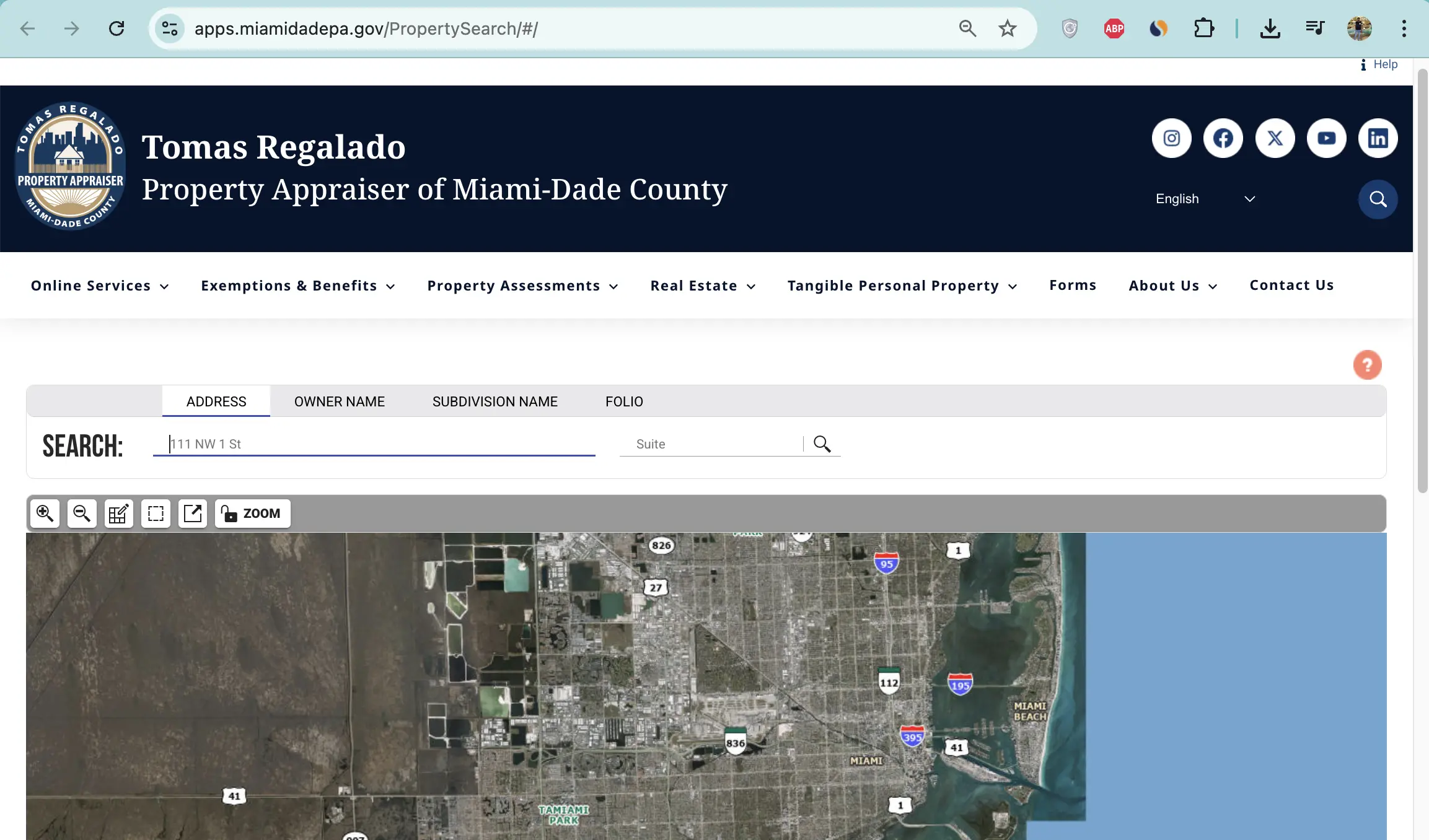
Bookmark this link on your phone and computer — you will use it many times every year.
Why You Should Use This Tool Every Year
- Check if your homestead exemption is active
- See your current market value and assessed value
- View sales history of your home and neighbors
- Find comparable sales for appeals
- Spot errors in square footage, year built, or owner name
- Check before you buy or sell a house
- Help with portability, senior exemptions, or fraud checks
Exact Micro-Steps to Search Any Property (Takes 30–60 Seconds)
- Open your browser (Chrome, Safari, Firefox, or Edge).
- Go to this exact link: https://apps.miamidadepa.gov/propertysearch/#/
- On the left side, click the drop-down menu that says “Search by”.
- Choose one of these options:
- Address (easiest for most people)
- Owner Name
- Folio/Parcel Number (16-digit number)
- Subdivision (neighborhood name)
- Click inside the white search box and type your information.
- Example for Address: 12345 SW 88th Street, Miami Example for Folio: 30-1234-5678-9012-3456 (no dashes needed)
- Click the big blue SEARCH button.
- A list of matching properties appears.
- Scroll and click the exact one you want (check the full address to be sure).
- The full detailed property record page opens.
What Information You Will See on the Full Property Record Page
- Current owner name and mailing address
- Just (market) value
- Assessed value
- Taxable value (after all exemptions)
- All active exemptions (homestead, senior, disability, etc.) with start dates
- Building details: year built, total living area (sq ft), bedrooms, bathrooms, stories, pool, garage, air conditioning type, building sketch (if available)
- Land details: lot size, zoning code, land use code
- Complete sales history (every sale with date, price, buyer, seller)
- Interactive GIS map with aerial photo (current + prior years)
- Taxing districts and current millage rates
- Links to comparable sales, other county departments, and more
How to Save or Print the Property Record (Very Important)
- On the full record page, look at the top right corner.
- Click the Printer icon.
- Choose:
- Summary Report (1-page quick view)
- Detailed Report (full multi-page with everything)
- Click Print or Save as PDF.
- Save the PDF on your phone or computer in a folder called “My Miami-Dade Property Records 2026”.
Pro Tip: Always save the PDF every January and after any major change (renovation, new purchase, etc.).
Advanced Uses of the Property Search Tool
For Homestead & Exemptions After you apply for homestead, come back here and check that it shows “Homestead” under exemptions.
For Appeals Use the “Comparable Sales” link on the map to find recent sales of similar homes in your neighborhood.
For Buying or Selling Search the exact address to see sales history, square footage, and last sale price.
For Business Properties Use the same tool — it shows tangible personal property (TPP) info too.
Troubleshooting – What to Do If You Can’t Find Your Property
- Try without the city name (just street number + street name).
- Try only the folio number.
- Remove apartment/unit number.
- Try “Incognito/Private” mode in your browser.
- Still nothing? Call 305-375-4712 and give them the address — they can look it up instantly.
Pro Tips from 18+ Years Helping Homeowners
- Bookmark the search page on your phone home screen.
- Check your property every January after new assessments are out.
- Check again right after you close on a new house.
- Search your neighbors’ properties — it’s completely public and legal.
- Take screenshots of the values and exemptions every year.
- If owner name or mailing address is wrong, email OwnershipChanges@MiamiDadePA.gov with proof.
- Use the aerial map to check for unpermitted additions (pool, room, etc.).
Common Questions People Ask
Q: Can anyone see my property information?
A: Yes — the tool is completely public.
Q: How often is the data updated?
A: Daily by the county.
Q: Do I need to create an account?
A: No — no login required.
Q: What is a folio number?
A: The unique 16-digit ID for your property (on every tax notice).
My Personal Promise to You
I personally read every message that comes through this site.
If you can’t find your property, don’t understand something on the record page, or need help using the information for an exemption or appeal, send me your folio number or full address. I will reply with clear, step-by-step help — free and fast.
This guide is updated daily. Bookmark this page and the official tool.
Last updated: February 24, 2026
Written & maintained by: Raj Patel Florida Property Tax Expert Also runs PascoCountyPropertyAppraiser.us and BrevardCountyPropertyAppraiser.us
Thank you for trusting this independent guide. You now know exactly how to use the most important tool on the Miami-Dade Property Appraiser website.